Sensitivity of the ecal parameter
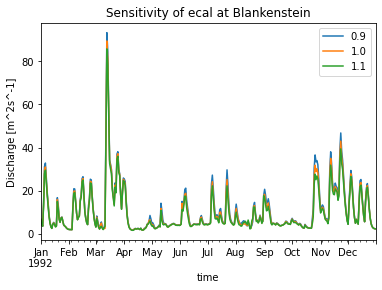
This example shows a simple sensitivity analysis, i.e. running SWIM sucessively with the basin-wide ecal parameter changed each time. The discharge changes between those runs will be plotted.
[2]:
import os
import pandas as pd
from matplotlib import pyplot as plt

import swimpy

# load the project instance
p = swimpy.Project()

# silence swim
p.config_parameters(log_stdout_level='error',
                    log_stderr_level='error')

# run for two years and without subcatch
p.config_parameters['nbyr'] = 2

# run the model while changing the basin-wide ecal parameter
ecal_values = [0.9, 1.0, 1.1]
q = pd.DataFrame()
for ecal in ecal_values:
    p.catchment['ecal'] = ecal
    p.run(quiet=True, save=False)
    # keep daily discharge at Blankenstein station
    q[ecal] = p.subbasin_label_daily_selected_stations_discharge['discharge']['BLANKENSTEIN']
    print('ecal=%s' % ecal)

# visualise results
ax = q['1992':].plot()
plt.title('Sensitivity of ecal at Blankenstein')
yl = plt.ylabel('Discharge [m^2s^-1]')
ecal=0.9
ecal=1.0
ecal=1.1
Convert to a (general) project function
If you are doing this sort of sensitivity testing more often, you can convert this little script to a project function. It is then accessible on the commandline and as method on the project instance. Put the below code into your swimpy/settings.py file.
[3]:
def sensitivity_catchment_parameter(project, parameter, values, plot=True):
    """Run the model with the parameter set to each value.
    """
    q = pd.DataFrame()
    for val in values:
        project.catchment[parameter] = val
        project.run(quiet=True, save=False)
        q[val] = project.subbasin_label_daily_selected_stations_discharge['discharge']['BLANKENSTEIN']
        print('%s=%s' % (parameter, val))
    if plot:
        # visualise results
        ax = q.plot()
        plt.title('Sensitivity of %s at Blankenstein' % parameter)
        yl = plt.ylabel('Discharge [m^2s^-1]')
    return q
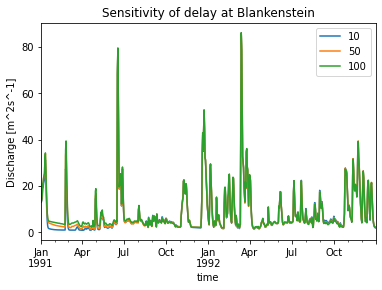
The function sensitivity_catchment_parameter is a generalisation of the above script and allows testing the sensitivity of any catchment parameter (in the catchment.csv file). You can now use it in a python script, e.g.:
[5]:
q = p.sensitivity_catchment_parameter('delay', [10, 50, 100])
delay=10
delay=50
delay=100
Or on the commandline, e.g.:
$ swimpy sensitivity_catchment_parameter ecal "[0.9, 1.0, 1.1]"